The following information describes how hard recovery works for an ESE-based datastore. This material is derived from the MSDN Windows Desktop Development, Extensible Storage Engine Functions website. See JetExternalRestore Function for more information.
There are three phases of recovery for an ESE-based datastore, and the second phase can have two parts. In Phase I, logs are required to bring a backed-up database to consistency (or an initial set of incremental logs can be used). In Phase II, any additional roll-forward logs that are available are consumed to make the database consistent. There is also a replay of the additional roll-forward logs. Phase III is the undo phase of recovery.
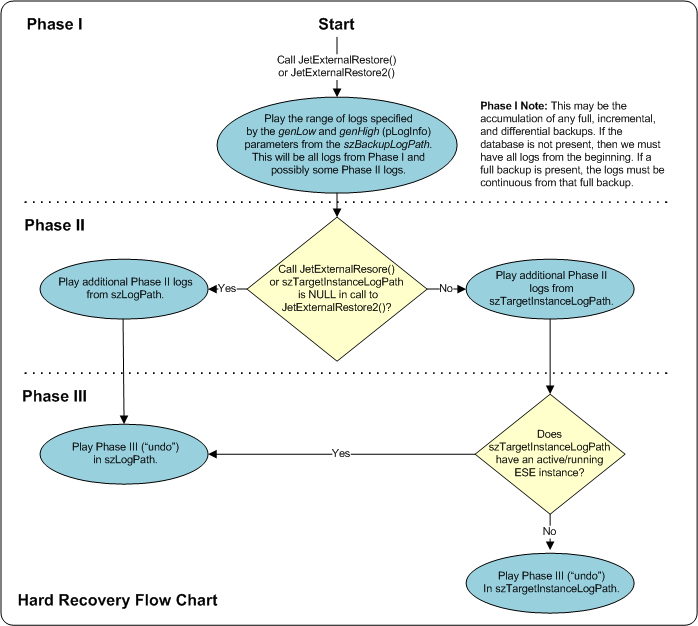
The replay of the set of logs that must be restored for the database to be brought to a consistent state (or an initial set of log files) is performed. Basically, this is the replay of the set of log files that are not optional for the databases being restored. If there are missing logs from this range of logs then the restore will fail. These logs should be put in the directory specified in the szBackupLogPath parameter.
Note: "szBackupLogPath" indicates the path to the directory where the log files are restored. These are the logs that were read off during the external backup sequence. For a CygNet database "szBackupLogPath" is equal to the <BACKUP_PATH>\databackup\new directory, where BACKUP_PATH is specified in the DBS-based service’s configuration file.
Optionally, there may be some sets of log files that are roll-forward log files, which come from incremental or differential backups and from the log files of an active instance. In the case of log files from incremental or differential backups, the log files can be placed in the directories specified in either the szBackupLogPath or the szTargetInstanceLogPath parameters, with the former being the recommended directory. The logs used for the roll-forward phase (phase II) should come from the same series of logs played during Phase I and should have continuously incrementing log numbers with no gaps from the Phase I logs. To play a database to be fully up-to-date with the log files currently being used by an active instance, the szTargetInstanceLogPath and szTargetInstanceCheckpointPath parameters must be specified. This can be done even while other databases are attached to that log set.
In the final phase of recovery, any uncommitted transactions are rolled back, which requires generating new log files and updating the checkpoint file. This phase is sometimes referred to as "undo." The checkpoint file path to use during this phase is the path analogous to the phase III log location; that is, if szLogPath is used for Phase III, szCheckpointFilePath will be used, if szTargetInstanceLogPath is used for phase III of recovery. szTargetInstanceCheckpointPath will be used.
Note: "szCheckpointFilePath" is the path for the checkpoint file to use during recovery if "szTargetInstanceCheckpointPath" is not specified or already has an active or running instance. "szLogPath" is the path or directory for the logs for the final phase (undo) of recovery, and possibly for the roll forward logs. This path may be the same as the "szBackupLogPath." For a CygNet database both"szLogPath" and "szCheckpointFilePath" are equal to the txlogs directory.
To understand how the paths work, review the following flow chart:
Note: "genLow" is the lowest log file number that is to be replayed from "szBackupLogPath." "genHigh" is the highest log file number that is to be replayed from szBackupLogPath. The full fidelity of an unsigned long should be preserved, but in current versions of the engine this number is a hexadecimal number in the range from 0x00000 to 0xFFFFF. This may change in future versions. "genLow" and "genHigh" are inferred from the database files.

|
|
|

